【Power Automate】Box上のファイルを自動的にPDF化するフロー
sanane SANANEBLOG
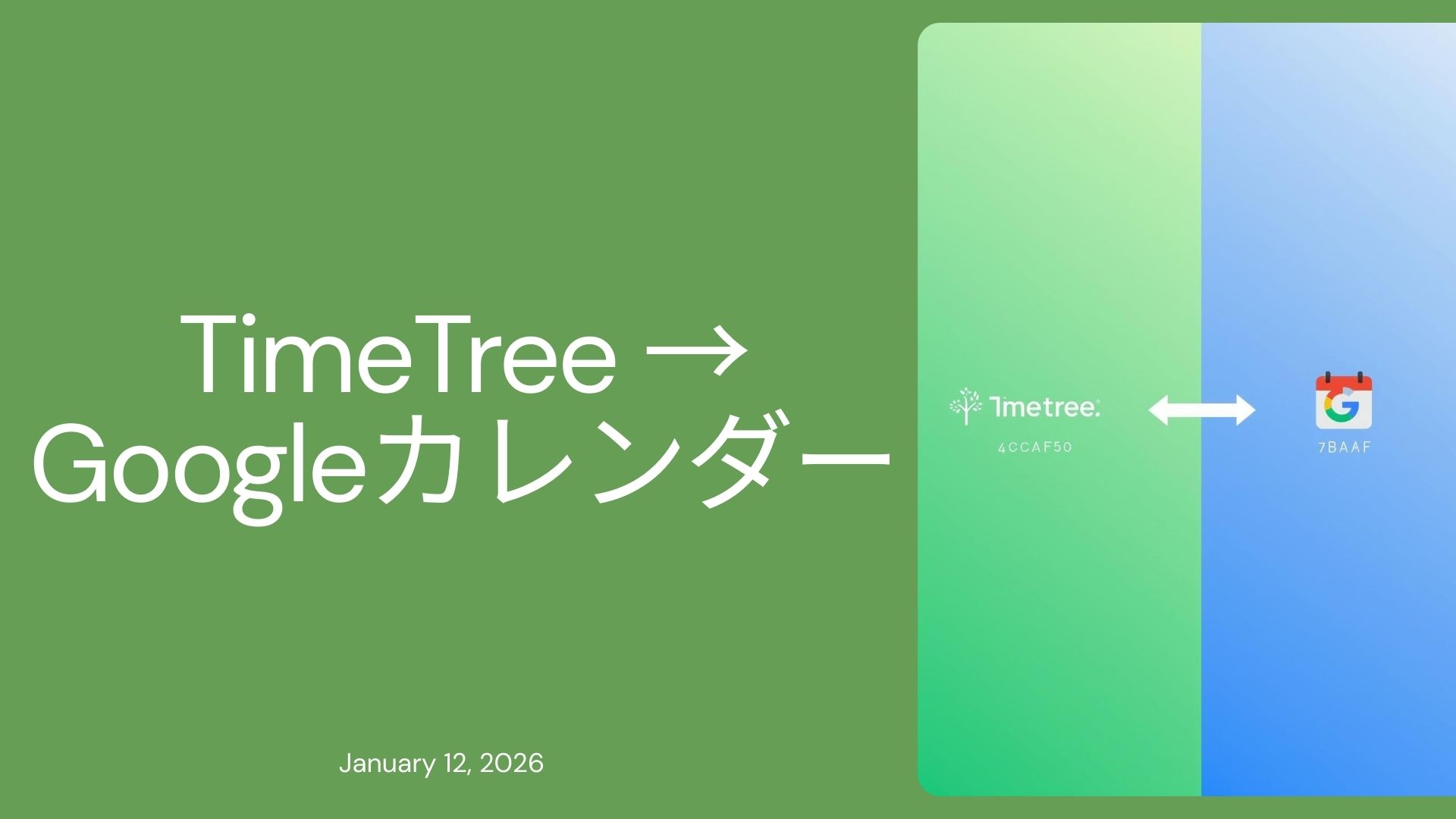
「TimeTreeの予定をGoogleカレンダーにも入れたいけど、手動で転記するのは面倒…」そんな悩みを抱えていませんか?
本記事では、TimeTreeの予定をワンクリックでGoogleカレンダーへエクスポートできるツールを紹介します。ブックマークレットとGoogle Apps Script(GAS)を使って、指定した月範囲のイベントを一括で転送できます。
共有カレンダーはTimeTree、個人の予定管理はGoogleカレンダー、という使い分けをしている方にぜひ試していただきたいツールです。
| 項目 | 内容 |
|---|---|
| ブラウザ | Google Chrome(PC版) |
| TimeTree | Web版(https://timetreeapp.com/) |
| Googleアカウント | スプレッドシートと同じアカウント |
| 項目 | 対応 | 備考 |
|---|---|---|
| 終日イベント | ○ | |
| 時刻指定イベント | ○ | |
| イベントタイトル | ○ | |
| メモ(説明文) | ○ | |
| 場所 | ○ | Googleカレンダーの場所欄に転記 |
| チェックリスト | ○ | 説明文にテキストとして列挙 |
| 通知(リマインダー) | ○ | ポップアップリマインダーに変換 |
| リンク | ○ | 説明文に含める |
| 二重登録防止 | ○ | TimeTree IDで判定 |
| 項目 | 備考 |
|---|---|
| 繰り返し予定 | 個別イベントとして取得される |
| 招待・参加者 | 抽出しない |
| 添付ファイル | 抽出しない |
TimeTreeの通知設定は、Googleカレンダーのポップアップリマインダーに変換されます。
| TimeTree | Googleカレンダー |
|---|---|
| 5分前 | 5分前 |
| 10分前 | 10分前 |
| 30分前 | 30分前 |
| 1時間前 | 60分前 |
| 1日前 | 1440分前 |
| 前日 | 1440分前 |
| 当日 | 0分(イベント開始時) |
| 1週間前 | 10080分前 |

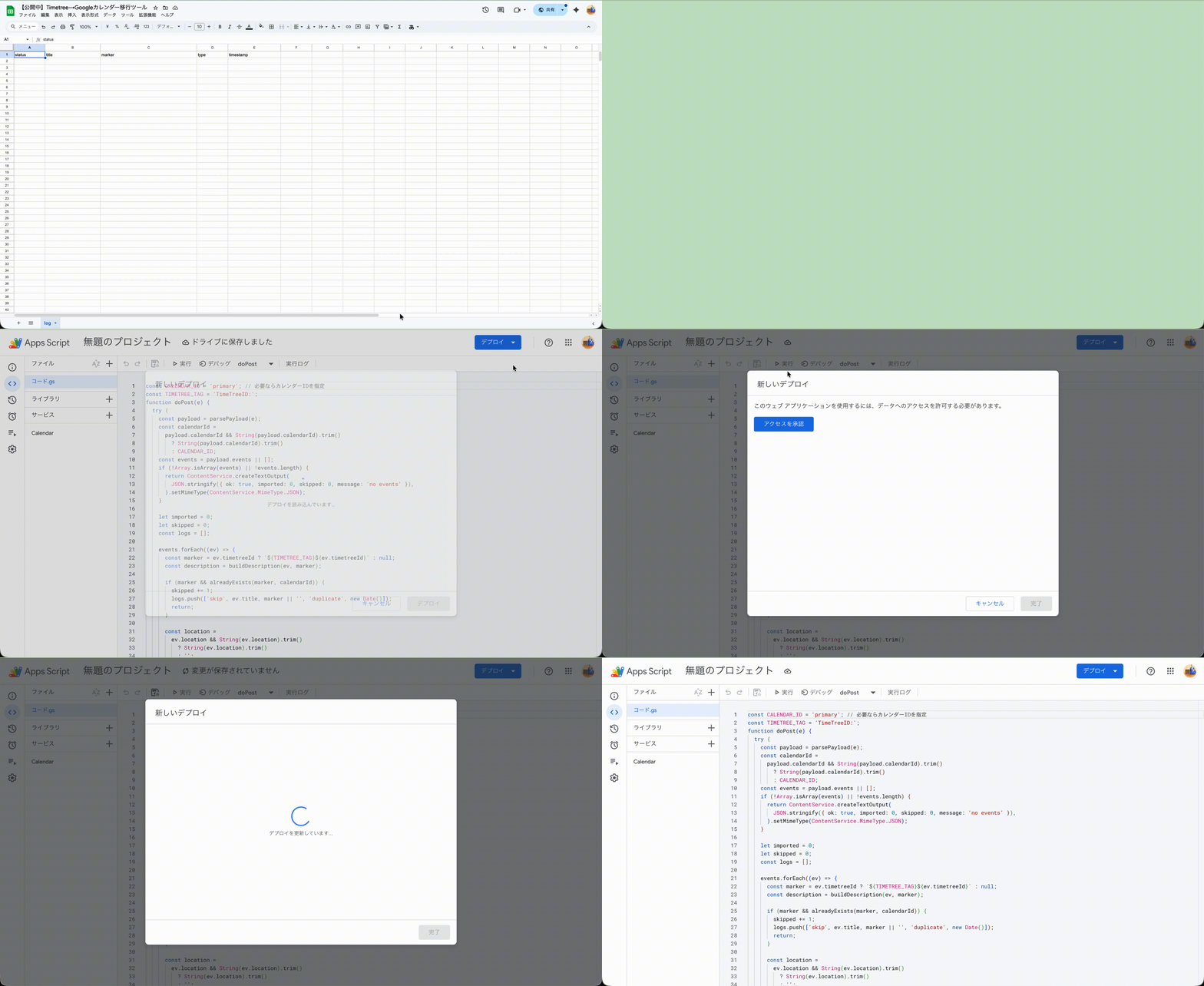
コピーしたスプレッドシートにはGASのコードがすでに含まれているため、コードを貼り付ける作業は不要です。
この認証を行うことで、GASがあなたのGoogleカレンダーにイベントを作成できるようになります。
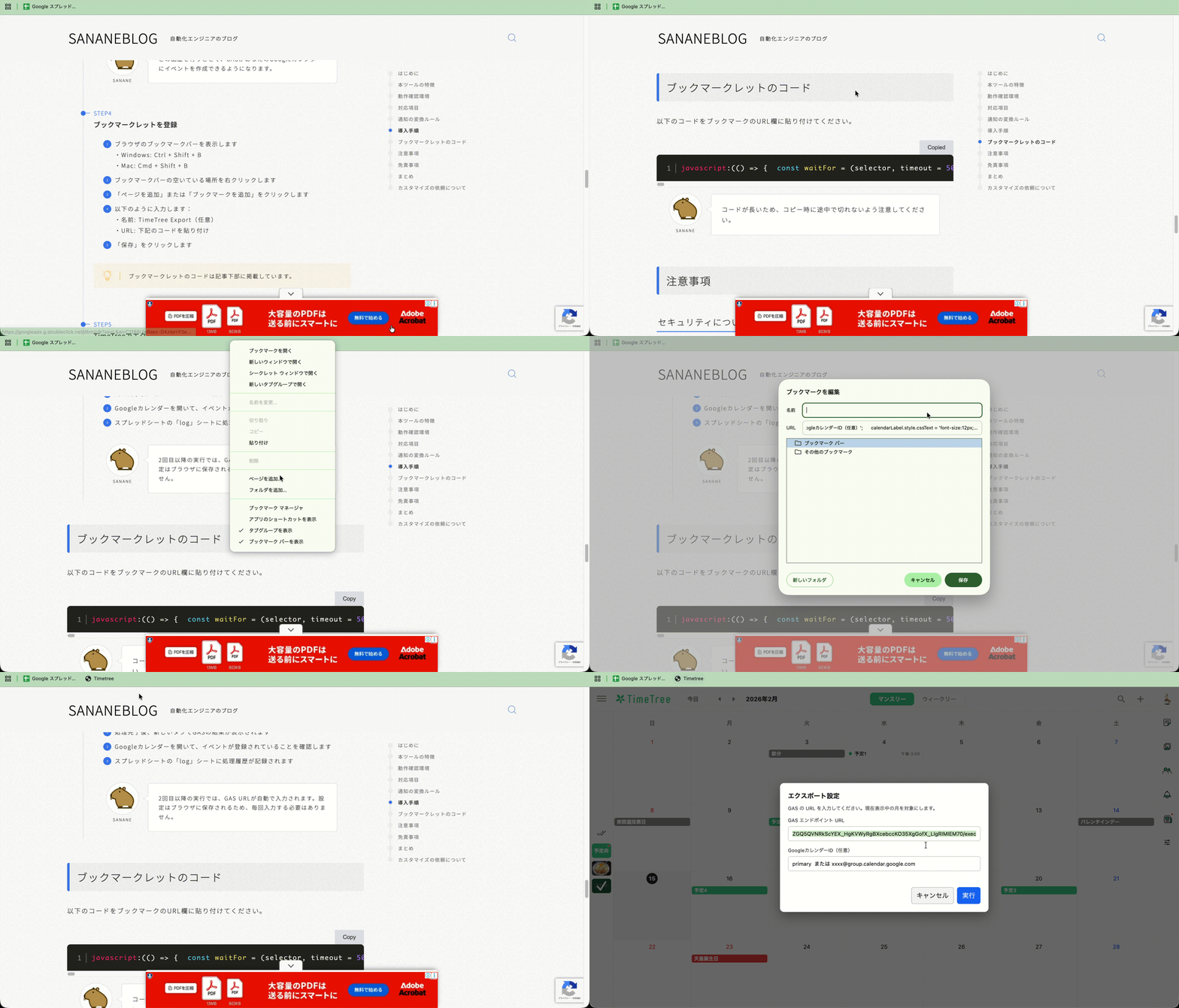
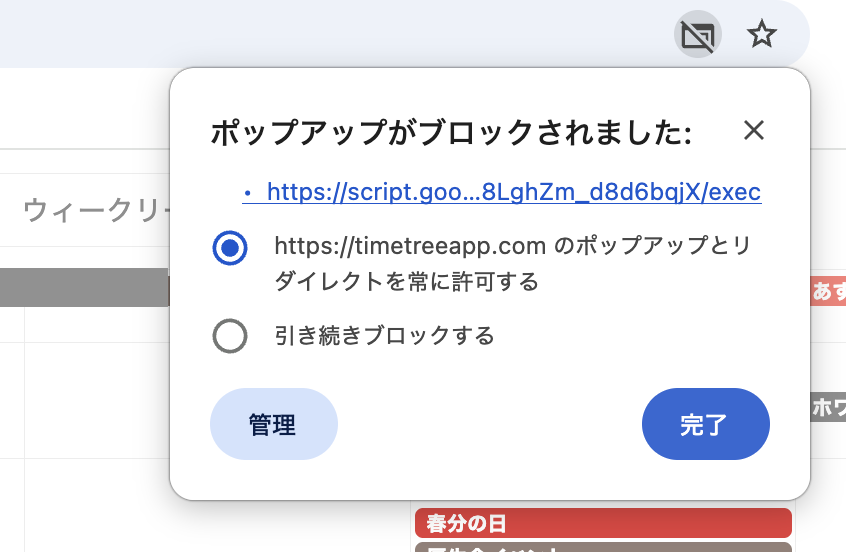
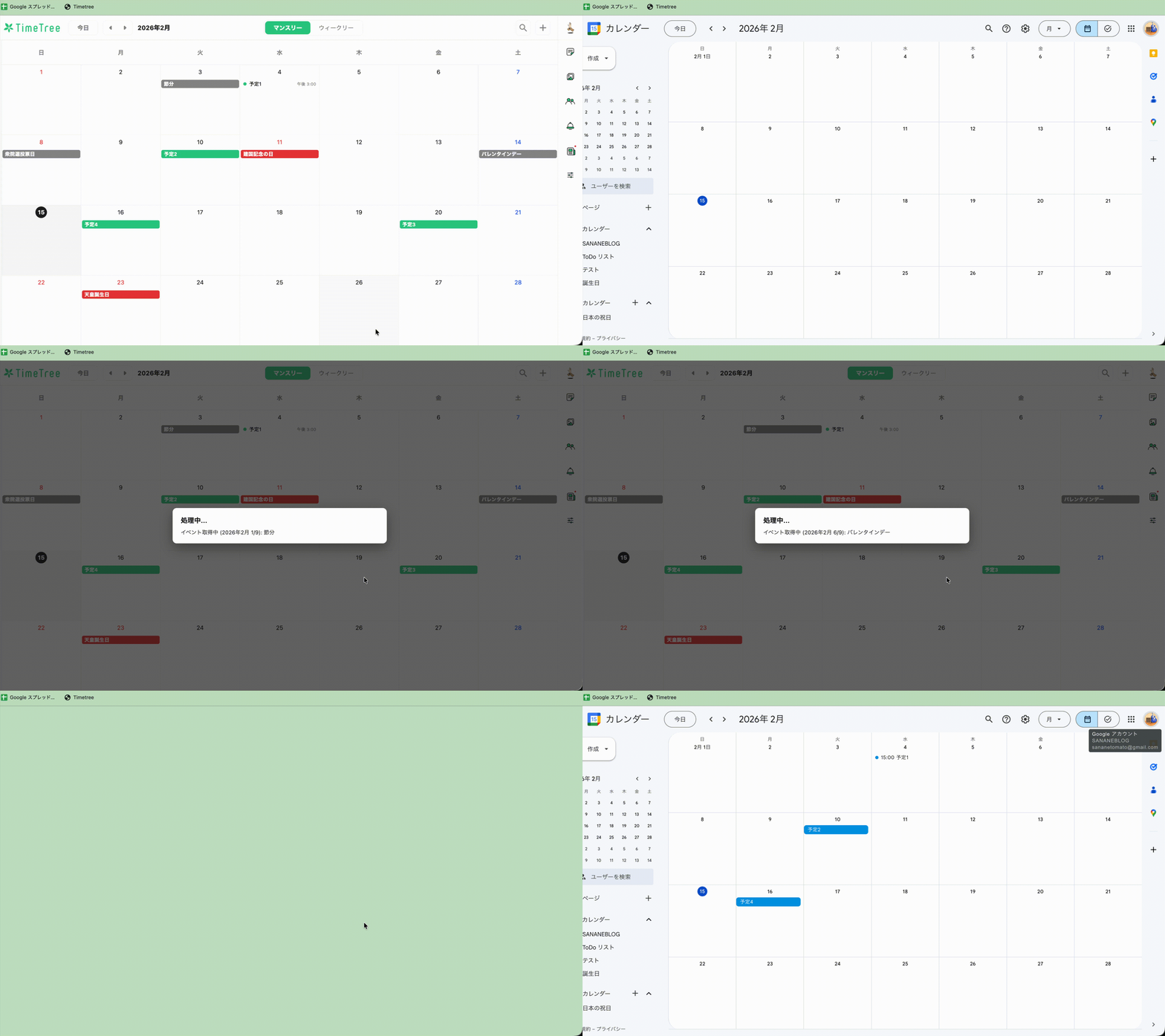
2回目以降の実行では、GAS URLが自動で入力されます。設定はブラウザに保存されるため、毎回入力する必要はありません。
以下のコードをブックマークのURL欄に貼り付けてください。
javascript:(() => { const waitFor = (selector, timeout = 5000) => new Promise((resolve, reject) => { const found = document.querySelector(selector); if (found) return resolve(found); const observer = new MutationObserver(() => { const el = document.querySelector(selector); if (el) { observer.disconnect(); resolve(el); } }); observer.observe(document.body, { childList: true, subtree: true }); setTimeout(() => { observer.disconnect(); reject(new Error(`Timeout: ${selector} not found`)); }, timeout); }); const sleep = (ms) => new Promise((resolve) => setTimeout(resolve, ms)); const getEventsForCurrentMonth = () => { const eventButtons = [ ...document.querySelectorAll('div[style*="--lndlxo2"] > button'), ]; return eventButtons.map((button, index) => { const container = button.parentElement; const spans = [...button.querySelectorAll('span')]; const title = (spans[0]?.textContent || button.textContent || '').trim(); const timeText = spans .slice(1) .map((span) => span.textContent.trim()) .filter(Boolean) .join(' ') || null; return { index, title, time: timeText, row: container?.style.getPropertyValue('--lndlxo2')?.trim() || null, day: container?.style.getPropertyValue('--lndlxo3')?.trim() || null, spanDays: container?.style.getPropertyValue('--lndlxo4')?.trim() || null, button, }; }); }; const extractDateTime = (detailRoot) => { const startBlock = detailRoot.querySelector( '[data-test-id="event-date-time-start"]', ); const endBlock = detailRoot.querySelector( '[data-test-id="event-date-time-end"]', ); const singleAllDay = detailRoot.querySelector('._1dctrbe2'); const normalize = (text) => text.replace(/\s+/g, ' ').trim(); const readBlock = (block) => { if (!block) return { raw: '', timeText: null }; const raw = normalize(block.textContent || ''); const timeEl = block.querySelector('._1nud6zk1'); const timeText = timeEl ? normalize(timeEl.textContent || '') : null; return { raw, timeText }; }; const parseDateString = (text) => { if (!text) return null; const t = text.replace(/[()]/g, ''); let m = t.match(/(\d{4})\s*年\s*(\d{1,2})\s*月\s*(\d{1,2})/) || t.match(/(\d{4})[\/.\-](\d{1,2})[\/.\-](\d{1,2})/); if (m) return { year: +m[1], month: +m[2], day: +m[3] }; m = t.match(/(\d{1,2})\s*月\s*(\d{1,2})\s*日/); if (m) { const year = new Date().getFullYear(); return { year, month: +m[1], day: +m[2] }; } return null; }; const parseTimeString = (text) => { if (!text) return null; const meridian = text.includes('午後') ? 'PM' : text.includes('午前') ? 'AM' : null; const m = text.match(/(\d{1,2}):(\d{2})/); if (!m) return null; let hour = +m[1]; const minute = +m[2]; if (meridian === 'PM' && hour < 12) hour += 12; if (meridian === 'AM' && hour === 12) hour = 0; return { hour, minute }; }; const startInfo = readBlock(startBlock); const endInfo = readBlock(endBlock); if (!startBlock && singleAllDay) { const dateText = normalize(singleAllDay.textContent || ''); const dateParts = parseDateString(dateText); const startDate = dateParts ? new Date(dateParts.year, dateParts.month - 1, dateParts.day) : null; return { startText: dateText, endText: dateText, startDate, endDate: startDate, allDay: true, }; } const startDateParts = parseDateString(startInfo.raw); const endDateParts = parseDateString(endInfo.raw) || startDateParts; const startTimeParts = parseTimeString(startInfo.timeText) || parseTimeString(startInfo.raw); const endTimeParts = parseTimeString(endInfo.timeText) || parseTimeString(endInfo.raw); const startDate = startDateParts ? new Date( startDateParts.year, startDateParts.month - 1, startDateParts.day, startTimeParts ? startTimeParts.hour : 0, startTimeParts ? startTimeParts.minute : 0, ) : null; const endDate = endDateParts ? new Date( endDateParts.year, endDateParts.month - 1, endDateParts.day, endTimeParts ? endTimeParts.hour : 0, endTimeParts ? endTimeParts.minute : 0, ) : startDate; const allDay = !startTimeParts && !endTimeParts; return { startText: startInfo.raw, endText: endInfo.raw, startDate, endDate, allDay, }; }; const extractMemo = (detailRoot) => { const memoSelectors = [ '[data-test-id="event-note"]', '[data-test-id="event-notes"]', '[data-test-id="event-detail-note"]', '[data-test-id="event-description"]', '[data-test-id="event-detail-description"]', '[data-test-id="event-text"]', '[data-test-id="event-memo"]', '[data-test-id="event-detail-text"]', '.exlc7u1', ]; for (const sel of memoSelectors) { const el = detailRoot.querySelector(sel); if (el) { const text = el.textContent.trim(); if (text) return text; } } return ''; }; const extractLocation = (detailRoot) => { const link = detailRoot.querySelector( 'a[href*="maps.google.com"], a[href*="google.com/maps"]', ); if (!link) return { name: '', url: '' }; const textEl = link.querySelector('.vjrcbi5') || link; return { name: (textEl.textContent || '').trim(), url: link.getAttribute('href') || '', }; }; const extractLinks = (detailRoot, locationUrl) => { const anchors = [ ...detailRoot.querySelectorAll('a[href^="http"]'), ].map((a) => a.getAttribute('href')); const filtered = anchors.filter( (href) => href && !href.includes('/events/') && !href.includes('maps.google.com') && !href.includes('google.com/maps') && href !== locationUrl, ); return [...new Set(filtered)]; }; const extractChecklist = (detailRoot) => { const items = [ ...detailRoot.querySelectorAll( '[data-test-id="checklist-row-item"] [data-test-id="list-item-title"]', ), ]; return items.map((el) => el.textContent.trim()).filter(Boolean); }; const extractNotifications = (detailRoot, locationName) => { const candidates = [ ...detailRoot.querySelectorAll('.vjrcbi5, .vjrcbi4'), ] .map((el) => (el.textContent || '').trim()) .filter(Boolean) .filter((text) => text !== locationName); const pattern = /(\d+)\s*(分|時間|日|週|週間)前|^(当日|前日|翌日)$/; return [...new Set(candidates.filter((text) => pattern.test(text)))]; }; const closeDetail = (detailRoot) => { const closeBtn = detailRoot.querySelector('button[aria-label="閉じる"]'); if (closeBtn) closeBtn.click(); }; const pad = (n) => String(n).padStart(2, '0'); const toDateStr = (d) => `${d.getFullYear()}-${pad(d.getMonth() + 1)}-${pad(d.getDate())}`; const toLocalIso = (d) => `${toDateStr(d)}T${pad(d.getHours())}:${pad(d.getMinutes())}:00`; const extractTimeTreeId = (detailRoot) => { const hrefs = [ ...detailRoot.querySelectorAll('a[href*="/events/"]'), ...detailRoot.querySelectorAll('link[href*="/events/"]'), ] .map((a) => a.getAttribute('href')) .filter(Boolean); hrefs.push(window.location.href); for (const href of hrefs) { const m = href.match(/events\/([a-zA-Z0-9_-]+)/); if (m) return m[1]; } return null; }; const parseMonthInput = (value) => { if (!value) return null; const m = value.match(/^(\d{4})-(\d{2})$/); if (!m) return null; return { year: +m[1], month: +m[2] }; }; const toMonthLabel = ({ year, month }) => `${year}年${month}月`; const getDisplayedMonth = () => { const timeEl = document.querySelector( '[data-test-id="calendar-pagination"] time', ); if (!timeEl) return null; const datetime = timeEl.getAttribute('datetime') || ''; return parseMonthInput(datetime); }; const createConfigModal = (defaults) => new Promise((resolve) => { const overlay = document.createElement('div'); overlay.style.cssText = [ 'position:fixed', 'inset:0', 'background:rgba(0,0,0,0.55)', 'z-index:2147483647', 'display:flex', 'align-items:center', 'justify-content:center', 'pointer-events:auto', ].join(';'); const modal = document.createElement('div'); modal.style.cssText = [ 'background:#fff', 'color:#111', 'width:min(520px, 92vw)', 'padding:20px', 'border-radius:10px', 'box-shadow:0 10px 30px rgba(0,0,0,0.35)', 'font-family:-apple-system,BlinkMacSystemFont,Segoe UI,Helvetica,Arial,sans-serif', ].join(';'); const title = document.createElement('div'); title.textContent = 'エクスポート設定'; title.style.cssText = 'font-size:16px;font-weight:600;margin-bottom:10px'; const help = document.createElement('div'); help.textContent = 'GAS の URL を入力してください。現在表示中の月を対象にします。'; help.style.cssText = 'font-size:12px;color:#444;margin-bottom:12px'; const urlLabel = document.createElement('div'); urlLabel.textContent = 'GAS エンドポイント URL'; urlLabel.style.cssText = 'font-size:12px;color:#333;margin-bottom:6px'; const urlInput = document.createElement('input'); urlInput.type = 'url'; urlInput.placeholder = 'https://script.google.com/macros/s/.../exec'; urlInput.value = defaults?.url || ''; urlInput.style.cssText = [ 'width:100%', 'box-sizing:border-box', 'padding:10px', 'border:1px solid #ccc', 'border-radius:6px', 'font-size:13px', ].join(';'); const calendarLabel = document.createElement('div'); calendarLabel.textContent = 'GoogleカレンダーID(任意)'; calendarLabel.style.cssText = 'font-size:12px;color:#333;margin:14px 0 6px'; const calendarInput = document.createElement('input'); calendarInput.type = 'text'; calendarInput.placeholder = 'primary または xxxx@group.calendar.google.com'; calendarInput.value = defaults?.calendarId || ''; calendarInput.style.cssText = [ 'width:100%', 'box-sizing:border-box', 'padding:10px', 'border:1px solid #ccc', 'border-radius:6px', 'font-size:13px', ].join(';'); const error = document.createElement('div'); error.style.cssText = 'font-size:12px;color:#b00020;margin-top:8px;min-height:16px'; const buttons = document.createElement('div'); buttons.style.cssText = 'display:flex;justify-content:flex-end;gap:8px;margin-top:16px'; const cancelBtn = document.createElement('button'); cancelBtn.textContent = 'キャンセル'; cancelBtn.style.cssText = 'padding:8px 12px;border:1px solid #bbb;border-radius:6px;background:#f5f5f5'; const okBtn = document.createElement('button'); okBtn.textContent = '実行'; okBtn.style.cssText = 'padding:8px 12px;border:1px solid #1b6ef3;border-radius:6px;background:#1b6ef3;color:#fff'; buttons.appendChild(cancelBtn); buttons.appendChild(okBtn); modal.appendChild(title); modal.appendChild(help); modal.appendChild(urlLabel); modal.appendChild(urlInput); modal.appendChild(calendarLabel); modal.appendChild(calendarInput); modal.appendChild(error); modal.appendChild(buttons); overlay.appendChild(modal); document.body.appendChild(overlay); const cleanup = (value) => { document.removeEventListener('keydown', onKey); overlay.remove(); resolve(value); }; const validate = () => { const urlValue = urlInput.value.trim(); if (!urlValue) { error.textContent = 'URL を入力してください。'; return null; } error.textContent = ''; return { urlValue, calendarId: calendarInput.value.trim(), }; }; const onSubmit = () => { const value = validate(); if (value) { try { localStorage.setItem('timetreeGasEndpoint', value.urlValue); localStorage.setItem( 'timetreeCalendarId', value.calendarId || '', ); } catch { } cleanup({ gasUrl: value.urlValue, calendarId: value.calendarId, }); } }; const onCancel = () => cleanup(null); const onKey = (event) => { if (event.key === 'Escape') onCancel(); if (event.key === 'Enter') onSubmit(); }; cancelBtn.addEventListener('click', onCancel); okBtn.addEventListener('click', onSubmit); urlInput.addEventListener('input', () => { if (error.textContent) validate(); }); calendarInput.addEventListener('input', () => { if (error.textContent) validate(); }); document.addEventListener('keydown', onKey); urlInput.focus(); urlInput.select(); }); const createProcessingOverlay = () => { const overlay = document.createElement('div'); overlay.style.cssText = [ 'position:fixed', 'inset:0', 'background:rgba(12,12,12,0.6)', 'z-index:2147483647', 'display:flex', 'align-items:center', 'justify-content:center', 'pointer-events:auto', ].join(';'); const box = document.createElement('div'); box.style.cssText = [ 'background:#fff', 'color:#111', 'padding:18px 20px', 'border-radius:10px', 'width:min(520px, 92vw)', 'font-family:-apple-system,BlinkMacSystemFont,Segoe UI,Helvetica,Arial,sans-serif', 'box-shadow:0 10px 30px rgba(0,0,0,0.35)', ].join(';'); const title = document.createElement('div'); title.textContent = '処理中...'; title.style.cssText = 'font-size:16px;font-weight:600;margin-bottom:8px'; const status = document.createElement('div'); status.textContent = '準備しています'; status.style.cssText = 'font-size:13px;color:#333;line-height:1.4'; box.appendChild(title); box.appendChild(status); overlay.appendChild(box); document.body.appendChild(overlay); return { setStatus: (text) => { status.textContent = text; }, remove: () => { overlay.remove(); }, }; }; (async () => { const storedUrl = (() => { try { return localStorage.getItem('timetreeGasEndpoint'); } catch { return null; } })(); const storedCalendarId = (() => { try { return localStorage.getItem('timetreeCalendarId'); } catch { return null; } })(); const displayedMonth = (() => { const current = getDisplayedMonth(); if (current) return current; const now = new Date(); return { year: now.getFullYear(), month: now.getMonth() + 1 }; })(); const config = await createConfigModal({ url: storedUrl || '', calendarId: storedCalendarId || '', }); if (!config) { console.warn('TimeTree bookmarklet: canceled by user.'); return; } const processing = createProcessingOverlay(); const results = []; const skipped = []; const seenIds = new Set(); const seenFallback = new Set(); const allEvents = []; try { const month = displayedMonth; processing.setStatus(`イベント取得中: ${toMonthLabel(month)}`); await sleep(200); const monthEvents = getEventsForCurrentMonth(); allEvents.push(...monthEvents); if (!monthEvents.length) { processing.setStatus(`イベントなし: ${toMonthLabel(month)}`); await sleep(200); } else { for (const [index, ev] of monthEvents.entries()) { try { processing.setStatus( `イベント取得中 (${toMonthLabel(month)} ${ index + 1 }/${monthEvents.length}): ${ev.title || 'イベント'}`, ); ev.button.scrollIntoView({ behavior: 'smooth', block: 'center' }); ev.button.click(); const detailRoot = await waitFor('[data-test-id="event-detail"]'); const titleEl = detailRoot.querySelector( '[data-test-id="event-title"]', ); const title = titleEl ? titleEl.textContent.trim() : ev.title || 'イベント'; const timetreeId = extractTimeTreeId(detailRoot); const dateInfo = extractDateTime(detailRoot); const memo = extractMemo(detailRoot); const location = extractLocation(detailRoot); const links = extractLinks(detailRoot, location.url); const checklist = extractChecklist(detailRoot); const notifications = extractNotifications( detailRoot, location.name, ); let isDuplicate = false; if (timetreeId) { if (seenIds.has(timetreeId)) { isDuplicate = true; } else { seenIds.add(timetreeId); } } else { const fallbackKey = `${title}|${dateInfo.startText}|${dateInfo.endText}|${dateInfo.allDay}`; if (seenFallback.has(fallbackKey)) { isDuplicate = true; } else { seenFallback.add(fallbackKey); } } if (isDuplicate) { skipped.push({ title, reason: 'duplicate across months', error: '', }); continue; } results.push({ title, timetreeId, allDay: dateInfo.allDay, startDate: dateInfo.startDate, endDate: dateInfo.endDate, startText: dateInfo.startText, endText: dateInfo.endText, memo, locationName: location.name, locationUrl: location.url, links, checklist, notifications, day: ev.day, gridRow: ev.row, spanDays: ev.spanDays, }); } catch (err) { skipped.push({ title: ev.title, reason: 'detail not accessible (non-clickable or already fixed event)', error: err.message || String(err), }); console.warn('Skipped event (detail not accessible):', ev.title, err); } finally { const opened = document.querySelector( '[data-test-id="event-detail"]', ); if (opened) closeDetail(opened); await sleep(250); } } } processing.setStatus('イベントを送信しています...'); console.table( results.map( ({ title, startDate, endDate, allDay, memo, day, spanDays, gridRow, timetreeId, }) => ({ title, timetreeId, start: allDay ? startDate ? toDateStr(startDate) : '終日' : startDate ? toLocalIso(startDate) : '', end: allDay ? endDate ? toDateStr(endDate) : '終日' : endDate ? toLocalIso(endDate) : '', allDay, memo, day, spanDays, gridRow, }), ), ); if (skipped.length) { console.table( skipped.map(({ title, reason, error }) => ({ title, reason, error })), ); } const gasEvents = results.map((r) => r.allDay ? { title: r.title, timetreeId: r.timetreeId, allDay: true, startDate: r.startDate ? toDateStr(r.startDate) : r.startText, endDate: r.endDate ? toDateStr(r.endDate) : r.endText, description: r.memo, location: r.locationName, locationUrl: r.locationUrl, links: r.links, checklist: r.checklist, notifications: r.notifications, } : { title: r.title, timetreeId: r.timetreeId, allDay: false, startDateTime: r.startDate ? toLocalIso(r.startDate) : r.startText, endDateTime: r.endDate ? toLocalIso(r.endDate) : r.endText, description: r.memo, location: r.locationName, locationUrl: r.locationUrl, links: r.links, checklist: r.checklist, notifications: r.notifications, }, ); window._timetreeEvents = allEvents; window._timetreeEventsDetailed = results; window._timetreeGasEvents = gasEvents; console.log( 'Stored window._timetreeEvents, window._timetreeEventsDetailed, and window._timetreeGasEvents. Each item keeps the button for manual clicks.', ); console.log('GAS payload (JSON):', JSON.stringify(gasEvents, null, 2)); const payload = JSON.stringify({ events: gasEvents, calendarId: config.calendarId || '', }); const form = document.createElement('form'); form.method = 'POST'; form.action = config.gasUrl; form.target = '_blank'; const input = document.createElement('input'); input.type = 'hidden'; input.name = 'payload'; input.value = payload; form.appendChild(input); document.body.appendChild(form); form.submit(); form.remove(); console.log('Posted to GAS endpoint via form submit (target=_blank).'); processing.setStatus('送信完了。タブで結果を確認してください。'); setTimeout(() => processing.remove(), 1000); } catch (err) { console.error('TimeTree bookmarklet error:', err); processing.setStatus(`エラーが発生しました: ${err.message || err}`); setTimeout(() => processing.remove(), 2000); } })();})();コードが長いため、コピー時に途中で切れないよう注意してください。

本記事では、TimeTreeの予定をGoogleカレンダーへ一括エクスポートする方法を紹介しました。
TimeTreeとGoogleカレンダーを併用している方は、ぜひ試してみてください。
「本記事の紹介内容をもっと自分用にカスタマイズしたい」(複数月の範囲実行など)
「設定がうまくいかず依頼したい」
「別のツールの作成依頼をしたい」
上記ご要望について、ココナラというサービスにて承っております。
相談は無料ですのでぜひお気軽にご相談ください。
[見積り相談をする]からご相談ください!